Help & support guides for your Apple iPhone 4S (iOS5)
Follow these instructions to add a task.
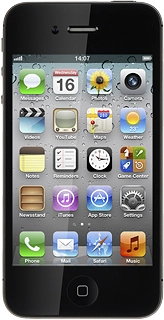
Press Reminders.
Press +.
Key in the required text and press Done.
You have a number of other options after you've created a task.
Select one of the following options:
Add reminder, go to 3a.
Set priority, go to 3b.
Mark task as done, go to 3c.
View completed reminders, go to 3d.
Press the required task.
Press Remind Me.
Press the indicator next to On a Day or At a Location to turn on the function.
If you select On a Day:
Press the date.
Drag the wheels to set the date and time.
If you select At a Location:
Press the field below At a Location.
Press Current Location or Choose Address....
If you select Choose Address...:
Press the required contact.
Press When I Leave or When I Arrive.
Press Done to save.
Press Done to return to the list of tasks.
Press Show More....
Press Priority.
Press None or the required priority.
Press the box next to the task.
When the box next to the task is ticked (V), the task is marked as done.
Slide your finger right.
Press the required task to see it.
Press Done.
Slide your finger left.
Press the Home key to return to standby mode.
Step 1 of -