Search suggestions will appear below the field as you type
Browse via device topic
Install Google Maps
You can use Google Maps to find a specific location on the map, to plan a route from one location to another and start GPS navigation. Remember, you need to activate an Apple ID on your phone.
Step 1 of 10
Step 1 of 10
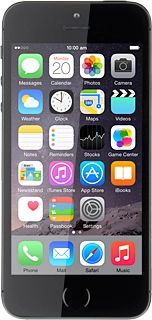
1. Find "App Store"
Press App Store.